Product records, files, assembly information and the work behind the equipment.
DRIVESOFT / ORION SOURCE UNIT 1
The details behind
the experience.
Choose the hardware, features and service path that fit your installation. Start with the sections that matter to you.
THE FULL PICTURE
Build the system around you.
Built on 20 years of Drivesoft vehicle-control experience. Choose dedicated audio, dedicated automation, or both in one box. Explore the controls, connections and installation choices below.
One build. One control center.
Spend your time on the build.
Separate pump, lighting, audio and show-control apps can mean separate settings, updates and support contacts. Extra background services can consume device resources, and changes in one part of an installation can affect how the rest works together.
Drivesoft’s approach is a coordinated control platform: familiar controls, shared configuration on compatible systems, and a common development and support path across the Drivesoft system. The aim is fewer disconnected control workflows and a more maintainable installation.
Keep your preferred music and social apps within reach on supported devices. Drivesoft does not replace their accounts or subscriptions, take ownership of their updates, or promise that every third-party app can be embedded or controlled.
Lighting, RGB, pumps & powered outputs
Control the equipment already in your build.
Bring existing compatible lighting into the Drivesoft system through the appropriate hardware or supported controller interface. Configure switching, participating zones, groups, brightness, RGB colors and available modes around the installation.
- Basic control card: 16 outputs and four inputs, with onboard power relays and expansion for larger installations.
- RGBW section: 16 channel outputs arranged as four independent RGBW zones. Switching outputs, RGBW outputs and inputs are separate specifications.
- Lighting and RGB: select individual groups or configured zones; coordinate compatible lighting with the interface palette or keep colors independent.
- Pumps, air ride and accessories: onboard power relays switch loads within the card’s electrical ratings. Higher-current motors and equipment use the appropriate contactor or power stage, with the required feedback and interlocks.
- Existing equipment: retain compatible lighting loads and integrate supported controllers. Drivesoft can take over lighting and accessory control directly through the appropriate drivers; hardwiring or replacement of the original accessory controller may be required.
- Show control: saved scenes and timed sequences can combine supported media, lighting and equipment with explicit start/stop controls.
Output electrical ratings and supply requirements follow the selected control hardware and connected loads. Hardware and engineered integration are separate from app/membership pricing.
Room to grow with your imagination.
The output counts describe the featured cards, not a ceiling for the platform. Add control modules to expand relay switching and RGB lighting for larger installations. We size the configuration around what you want to control.
Picture four 15-foot lighting strips in a coordinated lighting group. As Jack puts it: “Enough to make your car look like a Christmas tree.” The appropriate drivers and power feeds are selected for the strips and load.
Your vehicle. Your equipment. Your controls.
Make the button look like what it operates.
Choose a clear accessory graphic, name the control in your own words, or use a photo of the actual product in your build. Take a picture of your lights, compressor or other equipment, crop it for the button and assign it to the configured control. Use your own vehicle imagery to make the application feel like your vehicle.
We’re expanding the graphic library for car-audio and specialty builds: tire deflation, winch in/out, rear bumper lights, light bars, work lights, compressors and air-ride raise/lower controls. The familiar text-button layout remains available, alongside visual layouts that suit your installation.
Build around the equipment you actually own—including Rigid lighting, Metra accessories and air-ride products—with the appropriate electrical connection. The picture identifies the accessory; its assigned output or control profile operates it. Changing the picture does not change the wiring or control behavior.
Product names identify customer equipment; they do not imply a partnership or endorsement. Product-specific graphics and profiles are added to the library as they are prepared.
An automotive interface throughout.
Lights, air ride, pumps and accessory outputs stay inside dedicated automotive control screens with a darker Orion-style look, clear icons, labels and visible button states. Choose your theme—including the existing blue limo style—without changing the control system underneath.
 Light barPERSONALIZE
 Bumper lightsPERSONALIZE
 Winch outPERSONALIZE
 Winch inPERSONALIZE
 CompressorPERSONALIZE
 Tire deflatePERSONALIZE
 Air ride upPERSONALIZE
 Air ride downPERSONALIZE
Accessory artwork examples. Each control is assigned to the equipment and operating mode in your installation.
Optional Google sign-in & backup choices
Your account. Your choice. Your recovery options.
Choose local operation or optional account connections. Keep your configuration with you and use the backup destination that fits how you work.
- Local backup: save supported settings, presets and configuration to local storage or a compatible external drive.
- Email and cloud: choose supported backup destinations or delivery of an encrypted backup file/recovery link. Internet access is needed for online transfers.
- Credential protection: use the supported device credential manager for passwords/passkeys. Configuration backups and saved sign-in credentials are different functions; passwords are not ordinary email attachments.
- Recovery: restore compatible settings to supported hardware/software versions. Backup destinations and included information depend on the installed version.
Backup and restore options follow the installed release. Google accounts are optional; cloud services retain their own account requirements.
A whole lot of personalization. A surprisingly small backup.
Keep presets, settings, equipment profiles and skin selections together. Configuration data can stay compact even when the system it controls is extensive. Local and external storage give you a copy you control; supported cloud connections add another recovery option. Custom artwork and media are backed up separately where needed.
All these years later, we’re still making a little data do a lot.
External antennas & vehicle internet
Choose the connection that fits your vehicle.
The Source Unit hardware includes external antenna provisions for GPS/GNSS, Wi-Fi and Bluetooth. Choose suitable automotive roof, puck or other antennas for the installed radio modules; antennas are customer-supplied or selected by the installer.
- GPS/GNSS: a dedicated receiver/antenna path. Connector and active-antenna supply must match the selected receiver.
- Wi-Fi and Bluetooth: external RF connections use the appropriate fitted radio modules. Wi-Fi connector type follows the fitted radio module; Bluetooth may share a radio antenna path or require its own, depending on the module.
- Starlink: connect the vehicle network to customer-supplied Starlink equipment through the appropriate Ethernet/router arrangement. Drivesoft devices then use that network through supported LAN or Wi-Fi connections.
- Other internet sources: a compatible cellular router, phone hotspot or available Wi-Fi can supply the vehicle network. Provider accounts and service plans remain separate.
Antenna connector type, port count and supported bands follow the installed hardware configuration. GPS and Wi-Fi are not assumed to use identical connectors. Starlink uses its own terminal and service; it does not connect to a GPS or Wi-Fi antenna socket on the source unit.
References: Starlink: third-party router connections · Example automotive antenna connector families.
Source Unit connections & Alpine comparison
Before your next head unit, check the whole system.
Drivesoft brings established vehicle audio and control hardware into a compact package. The compact configuration includes six balanced line outputs, optical audio, Ethernet, two HDMI outputs, two USB data ports and dedicated amplifier triggers. The wider Drivesoft platform also supports four-HDMI-output configurations.
Drivesoft brings more than 20 years of commercial and industrial vehicle-control experience into the car-audio community, combining its established control platform with the balanced audio section.
THE ORIGINAL DRIVESOFT CONTROL SCREENS
This work has history.
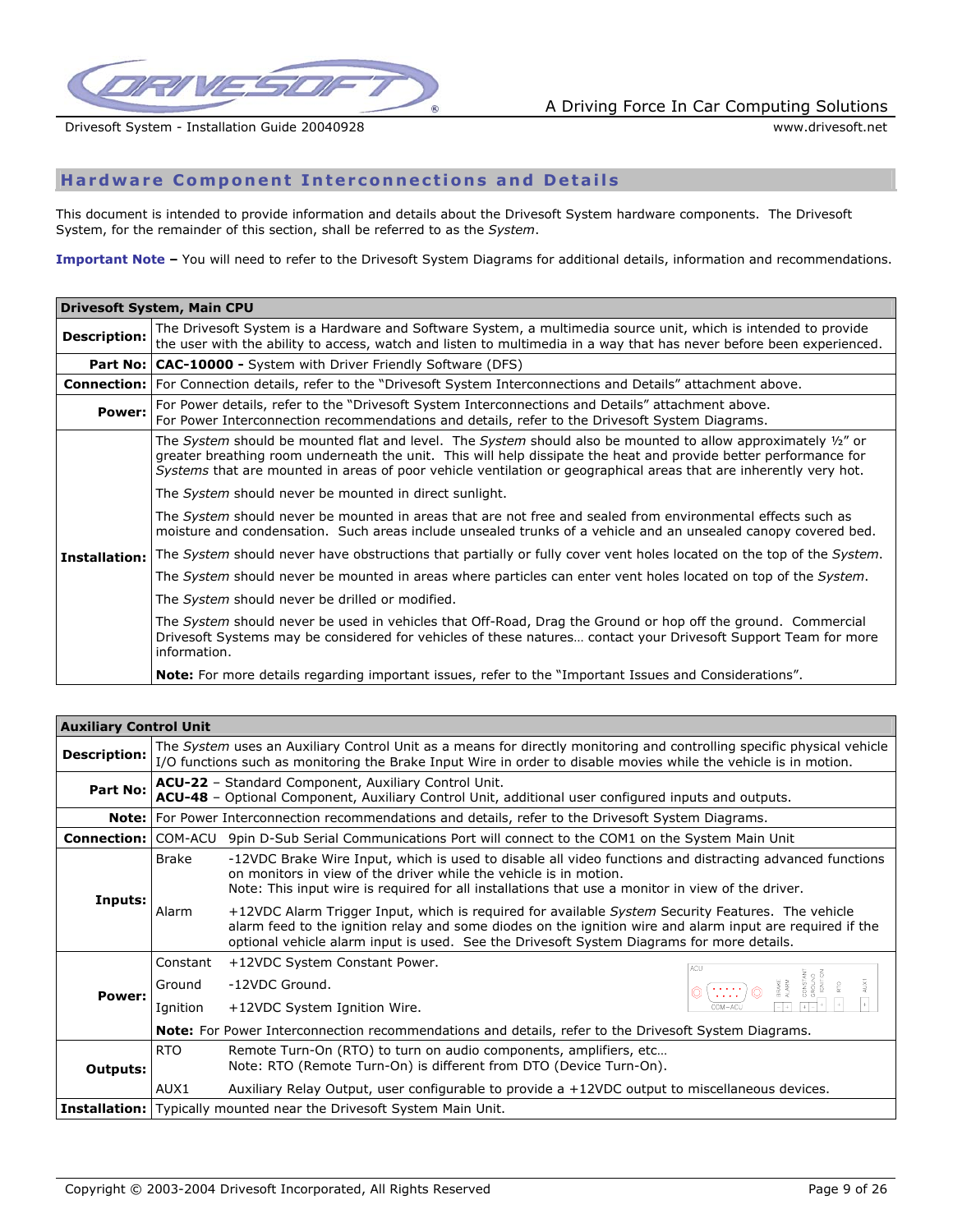
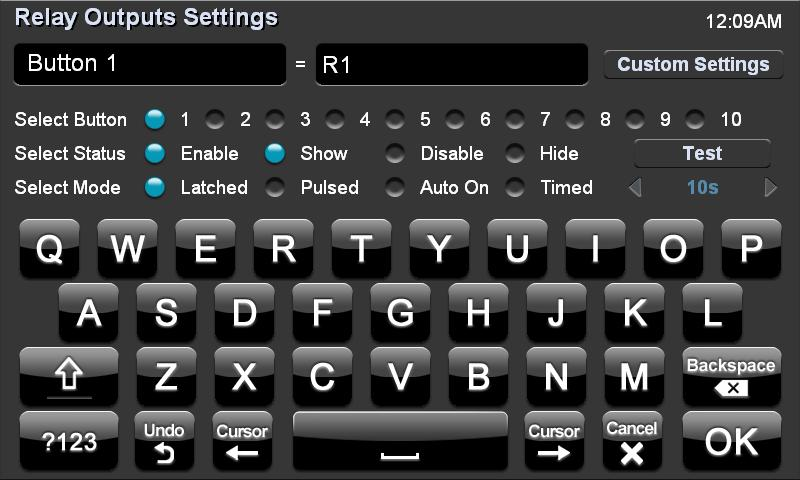
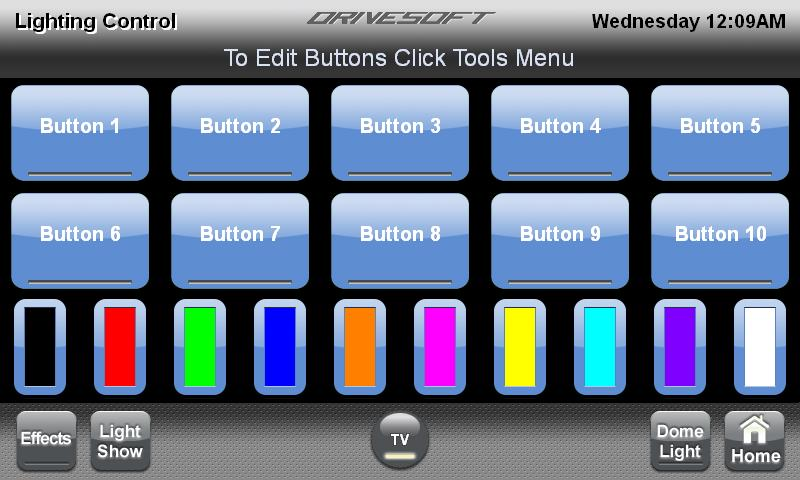
Our September 2004 installation guide documents serial-connected vehicle I/O and configurable relay control. Our 2007 user manual shows touchscreen relay switching. These original Drivesoft screens also show Latched, Pulsed, Auto On and Timed modes, plus RGB and Light Show controls.
See the dated 2004 installation-guide page →
Alpine’s KAC-001 lists eight accessory relay-trigger outputs with pulsed, latched and momentary modes. Compare that module with Drivesoft’s onboard power-relay cards, broader lighting controls and timed show sequences below.
| Function | Alpine iLX-F511 receiver / KAC-001 separately | Drivesoft Complete model / platform configurations |
|---|---|---|
| Audio line outputs | Three 4 V RCA pairs: front, rear and subwoofer. | Six balanced mono line outputs: front L/R, rear L/R and sub 1/2. External amplifiers required. |
| EQ, crossover and delay | 13-band parametric EQ per channel; six-channel time correction; high/low-pass crossover. | Channel selection, EQ, crossover, level, polarity, delay and saved profiles. |
| Speaker power | 18 W RMS × 4 built in. | Line-output architecture. Power amplifiers are separate; the source box does not directly drive speakers. |
| HDMI | One input and one output. | Two HDMI outputs in the compact configuration; four-output configurations are also available within the Drivesoft platform. HDMI input uses a separate capture interface. |
| USB | Two ports: one data and one charging only. | Two USB data ports in the compact configuration. Peripheral connections and charging capacity follow the installed hardware configuration. |
| Optical audio / network | No TOSLINK or wired Ethernet connector listed in the cited receiver connection inventory. | Optical digital audio connectivity and Ethernet. Optical input/output routing is specified for the selected audio configuration. |
| Amplifier triggers | Remote and power-antenna connections. | Dedicated amplifier and antenna remote control, alongside Drivesoft’s expandable accessory-control outputs. These dedicated connections do not represent the system’s total output capacity. |
| Cameras / microphone / AUX | Two direct camera inputs; microphone and AUX connections. | Direct camera inputs depend on the selected monitor or capture interface. IP cameras connect separately over the vehicle network for front, rear, side, cabin and other views; the monitor’s direct-input count does not limit network-camera expansion. Simultaneous viewing and recording capacity follows the installed network, processing and storage. Microphone and stereo AUX connections use the appropriate interfaces. |
| Radio and vehicle integration | HD Radio built in; Maestro and SiriusXM-ready functions require applicable hardware/services. | Drivesoft provides tuner control and vehicle integration through the installed interfaces, including steering inputs, vehicle data and control signals. SiriusXM streaming is accessed through its app on compatible connected devices; satellite reception uses compatible tuner hardware and service. Vehicle functions depend on the vehicle and fitted interfaces. |
| Accessory control | Optional KAC-001: eight 250 mA negative relay-trigger outputs; pulse, latch and momentary modes. Higher-current loads use suitable external relays. | Drivesoft basic control card: 16 outputs plus four inputs, with power relays onboard. Switch loads within the board’s ratings directly; use a suitable contactor or power stage for larger loads. Expand for the installation. |
| Control-system compatibility | KAC-001 operates through compatible Alpine head units with accessory-control support. | Drivesoft accessory control does not depend on owning a particular head-unit brand or model. Connect equipment through Drivesoft hardware, with direct wiring or the interface required by the installation. |
| Lighting and RGB | Alpine KAC-001: accessory relay triggering. Direct RGB control requires a separate lighting controller. | Drivesoft RGBW section: 16 channel outputs arranged as four independent RGBW zones, with zone/group, color, brightness and mode controls through the appropriate lighting drivers. |
| Show sequences | Not established by the cited receiver/KAC-001 feature lists. | Timed media, lighting and equipment scenes, saved presets and show controls. |
| Apps and displays | Dedicated receiver with supported phone projection and services. | Compatible tablet or dedicated display; Drivesoft controls with access to preferred streaming/social apps. Third-party services retain their own requirements. |
| External antennas / vehicle internet | GPS antenna connection, Wi-Fi and Bluetooth functions; external Wi-Fi/Bluetooth antenna jacks are not established in the cited connector inventory. | External antenna connections match the installed GPS/GNSS, Wi-Fi and Bluetooth modules. Customer-supplied Starlink, cellular or hotspot internet through a compatible network/router. |
Alpine product references checked November 2, 2026. The iLX-F511 receiver and KAC-001 accessory controller are separate comparisons; this table does not claim the KAC-001 works with the iLX-F511. Drivesoft figures describe the selected audio and control configurations. Your order identifies the fitted hardware.
Sources: Alpine iLX-F511 specifications · Alpine KAC-001 · KAC-001 installation manual Drivesoft: the hardware configurations described above.
Industries & the Drivesoft ecosystem
Your industry. Our platform. Let’s talk.
Drivesoft is the software interface across our products, projects and modules. The Orion car-audio collection is one part of that wider ecosystem. Each installation brings together the appropriate interface, software modules and compatible hardware.
- Car audio & entertainment: source units, media, tuning interfaces and dealer demonstrations.
- RVs & motorcoaches: interfaces for onboard systems, lighting, power, climate and entertainment.
- Limousines & luxury transport: passenger controls, lighting, climate, partitions and multi-screen entertainment.
- Specialty & custom vehicles: purpose-built controls and interfaces for commercial, accessibility and custom applications beyond RVs and limousines.
- Law enforcement & public safety: control interfaces for lighting, sirens, auxiliary equipment and vehicle systems.
Working in one of these industries beyond car audio? Give us a shout. We have interesting products and projects to discuss for your next build. Tell us your industry, the equipment you use and what you want to accomplish. We’ll discuss relevant products, current projects and development options.
These examples describe the wider Drivesoft portfolio and development work. Functions vary by product and release. Industry-specific modules, hardware, installation and commissioned development have separate requirements and pricing; the $99 Android purchase includes the Drivesoft and Orion skins.
Talk to Drivesoft about your application →Vintage audio registry · quick upload
VINTAGE AUDIO REGISTRY · QUICK UPLOAD
Help us find what’s still out there.
Register vintage Orion, a/d/s/, PPI or other products from Orion Industries and the Orion/a/d/s/ family. Amplifiers, speakers, subwoofers, crossovers, equalizers, processors, source units and accessories are all welcome. Send a clear product photo and a serial/model-label photo. No account required; your name and contact details are optional. Add model and serial information if you know it, or let us read the photos.
What’s it worth?
Documenting surviving examples and unusual revisions helps us understand rarity. Combined with condition, originality, provenance and documented sale prices, that record supports better-informed values for the equipment our community collects.
Help document surviving equipment, identify unusual boards and possible prototypes, and build the evidence for future authentication reviews, informed resale and museum exhibits. This is our community’s history—your equipment and your story belong in it.
“When they open it, it could tell a different story.”Register your vintage audio →
— Jack, on unusual amplifier revisions
Photos and serial numbers stay private for review. Registration is not an appraisal or authentication certificate.
Audio & tuning
Start with the speaker. Keep the controls familiar.
- Source, EQ, crossover and subwoofer component views; original 7 × 1 and 7 × 2 layouts retain their proportions.
- Speaker/channel selection with level, polarity, crossover and delay; graphic and parametric tuning options.
- Linked pairs or groups and independent left/right adjustment where supported.
- Listening, Competition and Bass Mode presets; saved known-good profiles and optional protection for tuned settings.
- Song-linked presets: save a tuning preset with a particular song and recall that setup when you play it. Keep song-specific bass or listening settings alongside your general profiles; a song-linked preset is separate from a timed competition clip or cue.
- Share your tuning: save and share frequency settings, EQ curves, crossover settings and tuning modes with other members. Include the equipment and channel information so the recipient can review the preset, map it to their system and save their own version.
- Manual time alignment. Automatic alignment tools are planned for a later release.
- Clear phone, call and media routing; respect the selected device and a user’s choice to stop connection retries.
Four hardware choices. One Drivesoft platform.
Choose the box around your build.
ORION INDUSTRIES USA · THE AUDIO COMES FIRST
The audio foundation stays.
The interface evolves.
Make no mistake: this is Orion Industries USA audio hardware. The Orion circuit path and original equalization approach remain at the heart of Source Unit 1. Drivesoft adds the software controls that bring that audio foundation into modern vehicles.
The sound and controls we have always loved, with new ways to use them. Familiar EQ formats, modern screens, saved settings and room for new capabilities—all built around the real hardware behind the interface.
Choose dedicated audio, dedicated automation, or both in one enclosure. The choice follows what you want to control, not the kind of vehicle you own. These models bring Drivesoft’s existing audio and vehicle-control capabilities into the package that fits your installation.
| Model | Price (USD) | What it brings | Included configuration |
|---|---|---|---|
| Source Unit 1 Integrale — Complete Flagship Kit | $4,100 | Full I/O audio and vehicle-control source unit. | Three matching 11-inch touch displays, wiring and included cables. Lifetime unlimited Pro access; qualifying dealers also receive lifetime dealer access, tied to this particular purchase. |
| Source Unit 1 Integrale — Full I/O Standalone | $2,350 | Audio and vehicle control together in one enclosure, with balanced line outputs, optical audio and expandable I/O. | Standalone unit. Displays selected separately. |
| Source Unit 1 Maestro — Audio | $2,250 | The dedicated audio platform: EQ, crossover, level, polarity, delay, saved tuning profiles and balanced line outputs. | Audio unit. Displays selected separately. |
| Automotive I/O & Lighting Controller — Black | $2,100 | Switching, lighting, RGB, inputs and timed equipment control for builds that already have their audio system. | Black control box; dedicated audio hardware is separate. |
Choose your hardware package →
Choose the hardware for your build.
Choose Maestro for the sound system, the black controller for vehicle and lighting control, or Integrale for both in one enclosure. The Complete Flagship Kit adds three matching 11-inch touch displays, wiring and the cable package: balanced audio cables, two HDMI cables, USB-C, USB-A to USB-C, TOSLINK and a network cable.
Choose your displays.
The $4,100 kit is based on three 11-inch touch displays. Choose matching sizes or a combination for your installation. Touch displays from 8.7 to 23.5 inches and non-touch displays from 32 to 55 inches are available as add-ons. Options include HDMI touch displays and tablets with Drivesoft Droid OS, depending on the installation. Other sizes and configurations change the package price; arrange your choices before payment.
HARDWARE RESERVATIONS
Reserve the configuration for your build.
Hardware release is planned for February 14, 2027. This is a planned release date, not a guaranteed shipping date. Hardware reservations begin with a 50% deposit, with the remaining 50% balance due February 14, 2027. We confirm the configuration and delivery arrangements with you before final payment.
Review hardware and preorder terms →The audio foundation.
The audio configuration provides six balanced mono line outputs: front left/right, rear left/right and two sub channels, together with optical digital audio connectivity and the familiar audio controls. External power amplifiers drive the speakers. Optical input/output routing follows the selected audio hardware.
The control foundation.
The basic control card provides 16 outputs and four inputs, with onboard power relays. The RGBW section provides 16 channel outputs arranged as four independent RGBW zones. These are separate hardware sections; the installation defines the fitted cards and expansion. Onboard relays switch loads within their ratings; larger loads use the appropriate power stages or contactors.
Audio and video over IP.
Drivesoft incorporates networked audio and video distribution for different installation layouts. Route media through the vehicle’s IP network to configured endpoints, alongside local audio and display connections. Build around front and rear entertainment, multiple displays or distributed media zones using the appropriate network, source and endpoint hardware. Choose local connections, IP distribution or a combination to fit the installation.
Choose the screen and connections.
- Use a compatible tablet, a dedicated touchscreen with the hideaway box, or a companion tablet alongside the system.
- The compact platform provides Ethernet, two USB data ports, two HDMI display outputs and amplifier/antenna trigger control. Four-HDMI configurations are also supported by the wider platform. HDMI capture inputs are separate from display outputs.
- Direct camera connections follow the selected monitor or capture interface. IP cameras expand separately over the vehicle network.
- Use the appropriate tuner, vehicle-data, lighting and DMX interfaces for the equipment installed. Accessory control does not require a particular head-unit brand.
- Keep a separate Drivesoft audio path alongside the factory system, or choose a full retrofit with the required OEM functions retained.
The Complete Flagship Kit includes the three base displays, wiring, listed cables and lifetime unlimited Pro access. Qualifying dealers receive lifetime dealer access tied to this particular purchase. Other packages and optional display upgrades follow their listed configuration. Power amplifiers, installation and third-party services are separate.
Explore connections and the Alpine comparison →Drivesoft workspace: apps, privacy & vehicle data
More screen. More room for your life.
- Tap the Orion moon to show or hide selected content around intact audio components.
- Navigation, supported radar information and trip tools; compatible garage/access integrations.
- Approved apps, calculator and practical utilities, Office activity, family contacts and useful shortcuts.
- Planned for a later release: an optional four-digit PIN and hidden message previews for personal or work content.
- QR-based sign-in for supported services, subject to each service’s authorization flow.
- Supported OBD vehicle data can share the panel with your selected apps and feeds.
- Your own photographs, business logo, albums and show presentations with fit and timing controls.
- Compatible camera feeds and selected modules; compact layouts can switch full-screen.
- Optional stock/business, weather and authorized competition-result feeds are development options; each feed needs a supported source and clear live/delayed status.
- Prompts and messages stay in the designated active area; moving-video use belongs on passenger interfaces.
Your private space, on your terms.
Conceal selected personal or work information with a privacy panel, then restore it when you choose. A dedicated panel or compact overlay keeps the layout useful on different screens. Supported door or passenger-entry signals can trigger the privacy view without needing to identify who entered.
Choose what is hidden, the available triggers and how it reopens. Essential vehicle status and controls remain accessible.
Vehicle control & measurement
Your installation, in one place.
- A configured vehicle view with equipment controls and status.
- Supported OBD readings, diagnostic reports, stored results and selected threshold alerts; availability varies by vehicle.
- Parked air-suspension presets with suitable controllers, pumps/valves and pressure or height feedback.
- Compatible lighting, accessories, actuators and other custom controls through the required interfaces.
- Connect your preferred competition meter through a compatible interface and pair its readings with saved tuning profiles. Available measurements follow the connected meter.
- Voltage/current and environmental sensors where fitted; measurement limits are specific to each sensor.
- Save and share your demo clips, with available competition-meter and sensor data for review and comparison.
Show Control & repeatable demonstrations
Set up the demo. Work the crowd.
You move. We move.
Bring your environment with you: the screens you choose, your lighting colors and patterns, your music settings, saved presets and the controls that make a space yours. Carry that personal setup across your Drivesoft-equipped car, RV, boat and show vehicles. Each installation maps your preferences to its own equipment, so the experience feels familiar wherever you go.
Your look. Across your whole lineup.
One show car or several, your RV or your boat: give them a recognizable lighting style that belongs to you. Save a common palette, patterns and scenes, then configure each installation around its own equipment. Link participating Drivesoft systems through a configured network to coordinate a shared exhibition, while retaining individual control of each vehicle. Keep the same identity across your products, whether they are displayed together or used separately.
Think stage-style lighting control, brought into the vehicle. Build cues, save scenes and run timed lighting and media sequences from Drivesoft. For a larger show, connect DMX lighting equipment through the appropriate control interface or gateway.
- Build a parked demo sequence around selected audio, photos/video, compatible lighting, LEDs, air ride and accessories.
- Use saved timing, presets and operating modes to repeat a presentation at a car show, limo/RV exhibition or dealer event.
- Carry your signature colors and lighting patterns across your car, RV, boat and show vehicles, with matching interface accents and lighting scenes.
- Start, stop and current-cue status belong in the interface; supported equipment feedback determines whether an action completed.
- Save Listening, Competition and Bass Mode settings separately. Recalling an audio profile does not automatically trigger vehicle movement.
- Pro collaboration can help refine a compatible show sequence, control layout or preset within an agreed scope.
Show sequences use the controls and feedback available in the installation. DMX connections require the matching interface, control protocol and fixture configuration.
Roll in together. Put on a show together.
Join the event. Join your crew. Coordinate participating Drivesoft vehicles for a shared lighting presentation, with each owner choosing to join and retaining local control. Your club’s colors, patterns and presentation carry across the lineup.
Save event highlights and clips, share them with other members and recognize the dealers and builders behind the work. Supported sharing routes connect the show to your wider audience.
Quick Draw: your track, your moment.
Save favorite albums and tracks, mark a start and stop point, and recall a timed demo or competition segment without digging through menus. Media cue presets stay separate from the EQ preset attached to a song.
SPL, sensors & Demo Recorder
Measure it. Record it. Compare it.
- Connect your favorite competition meter to Drivesoft through the appropriate supported interface. Keep the meter you trust and bring its readings into your build’s workflow.
- Compare measured SPL with source volume, selected tuning profile and available frequency, peak and average data.
- Add voltage/current and appropriate cabin, outside or subwoofer-box temperature sensors. Available readings depend on fitted hardware.
- Demo Recorder brings camera selection, framing, Record/Stop, saved clips and clip sharing into the system, using a supported tablet, USB or network camera.
- Save and share your recorded clips with other members. Pair footage with available measurement data for before/after comparisons, or reuse selected clips in your personal show and watch visuals.
Available measurements follow the connected meter and interface. The meter supplies the reading; the event organizer determines accepted competition equipment.
Watch controls & personal visuals
Source. EQ. Crossover. Subwoofer.
- Watch controls bring familiar component selection and compatible bass-level control to your wrist.
- Free Orion photo artwork is available now. Installable clock faces and working control apps are separate releases.
- Visual personalization can use the Orion logo, a supported personal image or a compatible short clip. The vehicle supplies the sound while the watch visual plays silently.
- Planned for later watch releases: phone-to-watch selection, cropping, preview and transfer. Compatibility information will accompany each release.
- Save and share personal clips with other members, and submit selected demonstrations for community features.
- Watch support varies by platform and model. Compatibility details will accompany each watch release.
Show-car owners, vintage builders & restoration shops
The electronics should belong to the build.
For the owners, builders and shops who bring their cars to major shows and collector-car events. You put care into the bodywork, interior, trim and every visible detail. The audio and controls deserve the same attention. A beautiful vintage build can lose its coherence when the equipment looks out of place or the system falls short. Drivesoft helps make the electronics belong to the car.
Built for the people who attend, exhibit and promote their cars at these events. The collector-car culture around Barrett-Jackson’s Scottsdale auction and Goodguys Southwest Nationals at WestWorld makes this attention to detail easy to appreciate. Carry that same care through the audio installation, the control surfaces and the equipment presentation.
Choose the era. Shape the experience.
Some builders want to retain original equipment. Others want the car-audio look they remember from a later decade, or a restomod with modern functions kept discreet. We work around that choice: selected vintage components, custom interfaces, familiar controls and Drivesoft hardware integrated into the vehicle’s design.
- Vintage equipment: practical restoration and integration support, available technical information and control interfaces for the components chosen for the build.
- Period-style presentation: tailored screen layouts, colors, graphics and controls that complement the dashboard and interior.
- Hidden capability: discreet audio processing and control hardware, with lighting, accessories and show functions brought together through Drivesoft.
- Builder collaboration: work with your installer, fabricator and restoration team on placement, wiring, equipment integration and the finished operating experience.
- Special commissions: bring us your reference images, vehicle details and component list for a custom service package and project quote.
Preserve the history. Make it usable.
A restoration can preserve its original character. A restomod can celebrate a chosen era while adding current functionality. We identify restored original equipment and newly built or adapted pieces clearly, so the story of the car stays as carefully assembled as the installation itself.
Give the whole build a presentation.
A beautiful car can still be overlooked when visitors cannot see or hear what makes it special. Bring the audio and controls up to the standard of the rest of the build, save a repeatable parked demo, and share clips that show the details and the people behind the work.
Discuss your vintage build →Custom fabrication and engineering are quoted for the individual project. Event names describe the collector-car community; they do not imply affiliation or endorsement.
Legacy equipment & technical knowledge
Good equipment deserves a future.
- Development around selected classic components and CD changers aims to preserve familiar controls and the character owners value.
- Explore modular interfaces and software control around supported equipment, with compatibility established product by product.
- Member resources span vintage and current equipment: available schematics, service information, installation guidance, troubleshooting and company developments.
- Repair shops, installers and experienced owners can contribute practical feedback and help identify useful development priorities.
- Pro members receive first looks and early trials of the nostalgic home-audio experience as new releases become available.
Legacy and home integrations are product-specific development work. Existing ownership of a component does not establish compatibility with a new interface.
Drivesoft membership, branded skins & ownership
One platform. Clear ownership.
The Drivesoft Digital Media Player for Android costs $99 USD once. Use it on up to three supported devices, with companion watch access. The standard Drivesoft and Orion skins are included.
The optional $4.99/month plan is a separate enrollment and includes future versions and custom skin color matching. The $99 purchase does not automatically start a monthly plan. Send a reference photo or color file to have your skin matched to your vehicle or show build. You can keep using your purchased version without a subscription.
Android software downloads begin November 6, 2026. After confirmed payment and release, we send your download and access instructions by email. Delivery is handled manually; PayPal checkout does not provide automatic download or license activation.
Buy the Android software →Standalone Pro membership is planned for customers who want access across the wider Drivesoft platform. Separate pricing and enrollment details will be announced.
Keep using what you purchased.
Choose not to renew? Your installed software and purchased hardware keep their existing local functions. Your customer records, jobs, invoices and other records remain available to view and export, with no renewal payment or unlock fee. Renewal brings the latest updates and applicable ongoing services.
Third-party services retain their own charges. Hardware, installation, shipping and commissioned projects follow their individual offer terms. Specific loaner, repair and warranty benefits are identified with the relevant package.
Explore Drivesoft Pro →Dealers & manufacturers
Drivesoft Dealer Program 2027 · $599 USD for the first year. Membership covers January 1 through December 31, 2027. The owner and employees receive Pro access under the store membership. Independent, home-based and mobile professionals are welcome. Physical hardware is sold separately. The Complete Flagship Kit’s lifetime dealer benefit for qualifying dealers is tied to that hardware purchase.
You bring the talent. We bring the control system.
We understand why dealers grew frustrated as sales moved online. Building and maintaining a showroom switching system takes time away from installations and customers—even when you have the skills to do it yourself. Drivesoft supplies the switching hardware, control software, configuration assistance and support, so your team can focus on assembling a sound room that shows what you do best. Hardware is selected for your showroom and priced separately from the dealer software program.
Bring the crowd back to your store.
Take the talent that draws a crowd around your show vehicle and bring that experience into your showroom. Give people a place to sit down, listen, compare systems and enjoy their favorite music. Make your sound room somewhere customers, friends and family want to visit again. Give your store an edge in the neighborhood: a polished presentation, demonstrations that run smoothly and a listening experience people remember. Show customers the care and expertise they can expect from your installations. Before someone hands you the keys to a vehicle they care about, they are already judging the care they can see. A clean, organized store and a working sound room help build that confidence. Put your demonstration system back to work so it reflects the quality of the installation behind it.
Hear it. Save it. Come back to it.
Visitors can save their favorite equipment configurations and listening settings without buying that day. When they return a month, two months or three months later, they can recall their saved setup, see the components they were considering and pick up the conversation where they left off. Recall the demonstration on matching showroom equipment, then review current pricing and availability when they are ready to buy.
- Included dealer Sound Room control: the dealer offering includes Sound Room control, product/pricing information and relevant store services, using the same Drivesoft platform as the demo vehicle.
- Run programmed, repeatable demonstrations tailored to your store, with Drivesoft helping configure the switching and controls around your equipment.
- Software sales, dealer-direct hardware and recurring-service opportunities, with program terms defining dealer participation.
- Installation information, available legacy schematics, repair knowledge and direct support.
- Explore POS integration and application development for shop workflows.
- Source-unit software and integration for equipment manufacturers, including an OEM app configured around the manufacturer’s equipment.
- This included dealer benefit is separate from the optional consumer membership. Contact us with your equipment and intended use so the package, compatibility and service scope can be established.
Put your history on display—and let people hear it.
Your store has more than products on a shelf. It has the equipment, experience and relationships that helped build this industry. Bring those classic components into the showroom, tell their stories and demonstrate working examples alongside today’s systems. Give longtime enthusiasts a reason to reconnect and newcomers a chance to hear what the history is about.
That experience takes years to earn. Put it to work: a listening room with character, vintage equipment kept in service and knowledgeable people who can explain what makes it special. Drivesoft connects the presentation, sound-room controls and repair resources so your heritage becomes part of the customer experience.
Keep the classics in service.
Finding an experienced vintage-audio repair shop can be difficult. If your dealership has basic soldering and component-replacement experience, we can help your team diagnose and repair many common faults in vintage equipment. Draw on available schematics, component information, practical repair guidance and direct technical support to build on the skills you already have.
Start with repairs that match your bench equipment and experience, with guidance on testing the work and recognizing when a specialist is needed. Keep valuable equipment working, preserve the knowledge behind it and give customers another reason to return to your store. We will extend that repair knowledge and service documentation to our newer products as well.
Run the business behind the build.
Using a collection of separate apps to run your store? Explore the upcoming Drivesoft Automotive Suite: File Search Manager, POS and the connected business modules. Register separately for free trial opportunities and guided trial runs as they open. Tell us what your shop needs so we can understand demand and help you evaluate the tools in your own workflow.
Register interest in Automotive Suite trials →This interest signup is separate from audio purchases and paid memberships. No payment is required to register interest.
One dealership program. Full access to Drivesoft.
The optional standard renewal is $1,199 per year beginning January 1, 2028. The $599 purchase covers calendar year 2027 only. Renewal requires a separate purchase; it does not renew automatically. Access Drivesoft’s software modules and technology, including POS, Sound Room control and business workflows. Dealer-specific buttons and routine workflow adaptations are included. Keep improving the system your staff knows instead of paying to start over whenever another app adds a new button.
Explore the systems behind the screen.
For more than two decades, we’ve built and used software inside automotive businesses, often for our own operations. Today we’re bringing those tools together for automotive audio, vehicle upfitting and product development.
Sound Room switching, saved customer configurations, POS and payments.
Jobs, equipment and customer relationships carried into the installation.
Service history, repair resources, warranty requests and shipping coordination.
Digital reach. Local opportunity.
Your relationships, demonstrations and installations help build the business. Our dealer program returns a defined share of qualifying digital sales to participating stores. We map registered store locations to agreed ZIP codes or service areas, alongside direct customer referrals, so digital business can support the communities helping create it.
Enrollment terms identify qualifying sales, attribution, service areas and payout rules. This maps participating stores and sales; it does not require continuously tracking customers.
Your showroom matters. Our distribution policy backs it up.
Drivesoft pro-audio products and applications belong in direct and authorized specialist channels. We will not sell them—or authorize new-product sales—on Amazon or eBay. We actively monitor listings to help protect that commitment. Genuine used resale and third-party products using our software are separate. Any larger retailer we consider must provide a dedicated specialty sales and service environment. Using a checkout service is separate from marketplace distribution.
Give them something to hear.
Let’s stop complaining about Amazon and give customers a reason to walk through our doors. They can compare prices online. In your showroom, they can hear the system, compare components and experience what proper installation and tuning bring to their music.
Your showroom. Your show.
Tell us about your displays, lighting, demonstration areas and daily routine. We help configure the switching, controls and show sequences around your store. Have an older switching system? Send its make, model and photos, along with what works and what needs attention, and we’ll help map the route back into service.
Direct support. Connected service.
For participating U.S. dealers, Drivesoft coordinates customer service, warranty requests and shipping through one connected workflow, with direct access to our team. Included benefits follow the customer’s package, so your staff can see what’s covered and keep the next step moving.
A practical path to getting equipped.
Payment arrangements for eligible equipment can combine a down payment, delivery and payments over an agreed term. Talk with us about the showroom and hardware you need. Physical equipment, installation and third-party services are separate from the dealer software program.
Your business. Your records. Your control.
Your customer records, jobs, invoices and other business data remain yours to view and export without a renewal payment or unlock fee. Choose not to renew? Keep using your installed version and accessing your records. Renewal brings new updates; it does not buy back access to your own business.
Talk with Drivesoft about your dealership →Devices & release access
Featuring Samsung Galaxy.
- Drivesoft software has been tested on Samsung Galaxy tablets in the project. The supported model/build list will accompany the release.
- Other Android hardware may qualify after screen, performance, audio and app checks.
- Phone, watch and external hardware functions have separate requirements and release stages.
- Samsung, Apple and Garmin device names describe compatibility directions, not a partnership or endorsement.
- Android software downloads begin November 6, 2026.
- The launch list is free. It records interest; it is neither a software purchase nor a reserved license.
Industry knowledge, languages & the next generation
Real skills. More voices.
Experienced builders, installers, competitors and skilled enthusiasts can help others learn. Whether you run a shop, work in another trade or build after hours, bring your results and your willingness to teach.
Our learning work starts with the language of the industry: useful terms, selectable spoken feedback and demonstrations tied to the task. Italian and other language packages connect everyday controls with deeper learning. Schools, new installers and experienced hands all have a place in that direction.
Find your place in the industry.
Installation, fabrication, tuning, competition, photography, video and presentation all contribute. Team N-Tense brings experienced people and newcomers into the conversation, with practical learning and opportunities to participate at events.
We’re building this around useful knowledge and hands-on experience, not job titles or follower counts.
A developer’s view: let the controls make sense
“It feels like everybody is trying to out-Photoshop each other. I want an audio system, not a sticker collection. Give me controls that make sense—and let me choose the look.”— Jack Cali, Drivesoft
Familiar audio controls, a clear layout and room to personalize. Choose an expressive skin, a classic component face or a clean automotive screen while keeping the functions easy to find.
From the garage to the platform
There’s a company behind the screen.
Garage builds, thirty-dollar trophies, Orion relationships, early vehicle computers and years of commercial installations all helped shape Drivesoft. Explore Jack’s account, the people involved and the original records behind the work.
Read the Drivesoft story →BEFORE YOU ORDER
Clear choices. Clear terms.
What does the software purchase cover?
The Drivesoft Digital Media Player for Android costs $99 USD once. Use it on up to three supported devices, with companion watch access. The standard Drivesoft and Orion skins are included. Compatible installed hardware is required for equipment control and is sold separately.
What is the Drivesoft membership for?
The optional $4.99/month plan is a separate enrollment and includes future versions and custom skin color matching. The $99 purchase does not automatically start a monthly plan. You can keep using your purchased version without a subscription. Standalone Pro program pricing will be announced separately.
What happens if I stop renewing?
Keep using your installed version and purchased hardware. Existing records stay accessible and exportable without a renewal payment or unlock fee. New updates and applicable ongoing services require active access.
Are installation and warranty included?
Your chosen product and package identify hardware, installation, warranty, shipping, repair and loaner provisions. The order shows which items are included and which are separately priced.
When can I download and buy?
Android downloads begin November 6, 2026. Buy through Drivesoft checkout. After confirmed payment and release, we email your download and access instructions manually. PayPal checkout does not provide automatic download or activation. Joining the launch list and downloading watch artwork are free.
How does compatibility work?
Choose the device, interfaces and hardware around your installation. Photo artwork, installable watch faces and working remote apps have different requirements. The selected product identifies supported models and functions.
Tell us about your build.
Share your device and interests so we can point you toward the relevant release information.
Join the launch list →DRIVESOFT PRO · TEAM N-TENSE
Standalone Drivesoft Pro membership is in development. Pricing and enrollment details will be announced separately.
Bring your build. Bring your experience.
A seat at the table for enthusiasts, installers, competitors and repair shops. Put the platform to work, collaborate directly and help shape what comes next.
- Full software access.
Explore current and future Drivesoft software releases as they arrive: audio, vehicle control, business tools and home applications. - Your show. Your controls.
Work with us on show sequences, useful shortcuts, presets and layouts for your equipment. - First access.
Try eligible early releases and contribute feedback from real installations, including our home-audio and ADS expansion. - Equipment opportunities.
Access available prototypes, development surplus and scratch-and-dent units, with condition, pricing and support stated for each offering. - Keep equipment working.
Special product pricing, service resources, member trading and equipment loaner opportunities under the applicable offer terms. - Connect the right people.
Introductions across installation, interiors, paint, fabrication and electronics, with help coordinating the handoffs on a build.
Your experience deserves recognition.
You know the equipment, how to use it and the history behind it. That firsthand experience makes your recommendation valuable. Pro members are part of our sales community, helping others find the right system through real demonstrations and real knowledge.
Earn referral commissions or equipment credit on qualifying Drivesoft hardware and software purchases you help bring in. Let the time you spend demonstrating your build, sharing your experience and introducing people to the products contribute toward your next piece of equipment—or earn a commission.
Your friends, fellow competitors and industry contacts are welcome to buy directly from us, whether or not they belong to our online groups. Have them identify you when they contact us so we can connect the introduction to you.
Referral rates, eligible products and commission or equipment-credit terms will be provided with the Pro program. Participating brands continue to sell through their respective authorized channels.
Bring the classics home.
Bring the familiar audio experience to the large screen in your home media center. Pro members help shape layouts and controls around the equipment they enjoy, with first access as the platform extends into home audio and ADS. Our direction: Orion’s entry into the home and ADS’s return to it.
Your active Pro access includes these software releases as they become available. Physical hardware, installation and commissioned projects are separate.
We intend to keep earning it.
If the ongoing value isn’t useful to you, you can stop renewing. Your installed version, purchased hardware and existing records remain yours to use. No payment is required to view or export your records.
Talk with us about Pro →AROUND THE INDUSTRY
Events, education and competition. Explore the organizations and shows connecting the community.